

AiDE® - Product + platform
AiDE® - short for Artificial Intelligence Driven Everything - is a cutting-edge generative AI platform designed to streamline technology product and service delivery for enterprises. AiDE® empowers organizations to innovate faster, reduce support teams, and dramatically lower the cost of maintaining quality at scale.

The business need
Launched by ValueLabs, AiDE® incorporates Gen AI into the daily workflows of enterprise engineers, helping them accomplish more work in less time while adhering to stringent security and quality standards. It features robust data-privacy and security pipelines to protect enterprise data and IP, with built-in input and output guardrails for reliable, compliant results.
In Phase I the product launch aimed to boost each employee's efficiency by 40%.
In Phase II of the AiDE® product would target a 10× increase in productivity for every employee.


Product audience - personas
The platform serves two primary user personas differentiated by feature access and CRUD permissions. Admin users enjoy elevated capabilities, such as creating team projects, managing users, integrating third-party apps, and accessing team-wide data and dashboards.
Product goals
Fasten and improve efficiency of the Software Development Life Cycle (SDLC) & Software Testing Life Cycle (STLC) using Generative AI
Create an intuitive, user-friendly platform that meets the needs of all stakeholders
Integrate data driven features to enable and measure the 40% efficiency target of Phase I of AiDE®

Key product features and highlights
AiDE® serves as a 1-stop hub for every phase of the software lifecycle - development, testing, modernization, migration, code documentation, and more - delivering end-to-end support and AI-driven output tailored to each use case.
Team creation
Admin users can create project specific teams and edit, archive, and delete these teams. Admin users maintain these teams by adding or removing users. End users can raise requests to be added to teams.
Moderated access control
Users can only access their respective teams ensuring data safety. Additionally, admin users can set specific access restrictions for their teams based on project compliance measures and security protocol.
Integrations
AiDE® offers custom extensions & plugins for a streamlined workflow. Easy integration with tools such as Jira & Azure DevOps allows for the import and export of user stories. The AiDE® plugin is compatible with popular IDEs such as VS Code, Eclipse, and IntelliJ.
End to end SDLC pipeline
Users can create new user stories and edit existing ones. User stories can be imported from integrated tools such as Jira & Azure DevOps. Users prompt AiDE® to generate desired code output, along with supporting info for respective user stories.
End to end STLC pipeline
Users can create, manage, and edit both manual and automated test cases - ranging from unit tests and integration tests to functional and regression tests - all within the platform.
Use AiDE® solutions for relevant & specific use cases
These are precision-driven technology solutions, structured into steeper modules that empower product and engineering teams to build, with confidence, smarter and faster.
Feedback loop
User feedback is used to as a basis to continuously make improvements to code and content generation.
Quality filters and Security
Template set responses are used for abusive or malicious prompts. Guardrails ensure responses are appropriate and security compliant.
Primary user journey
After selecting a specific team project, users enter a prompt to generate relevant output. AiDE® responds with contextual code along with supporting information. Users can track effort savings in real time, aligning with the broader business goal of increased efficiency and measurable progress. Each code block can be selected and individually viewed using the content display format that best suits the user’s preference or workflow.
tracking efforts saved
As soon as users begin prompting, the platform asks them to enter an estimated time it would take to complete the task without AI assistance. This input can be edited anytime via the top-right section of the interface. To close the loop on effort tracking, users can later input the actual time taken with AiDE®’s support - enabling a clear comparison and helping measure AiDE®-driven efficiency gains.
Reminding Users to Complete Effort Tracking
Tracking effort saved for each user story is crucial, as it provides concrete proof of time saved and directly reflects how well business goals are being met. If a user skips entering their actual effort, the platform automatically triggers a reminder popup when they attempt to create or open a new user story - prompting them to complete the missing entry.
Few other important screens

Manage users screen

Add user screen

Dashboard screen
User stories + Solutions
The product is built around two core modules: User stories and AiDE® Solutions. User stories, typically imported from tools like Jira, support users with development and testing tasks in their projects. AiDE® Solutions, in contrast, are purpose-built for specific use cases - such as design-to-code conversion, code documentation, and code migration or upgrade tasks—offering focused, high-impact assistance tailored to enterprise needs.
AiDE® Solutions
These are precision-driven technology solutions, structured into steeper modules that empower product and engineering teams to build, with confidence, smarter and faster.
AiDE Design to Code
Convert Figma screens to React page by providing a few simple details
AiDE Explain
Inline documentation and dependency table generation with one click.
AiDE Idea to Launch
AiDE® generates high quality software, from concept to deployment rapidly and efficiently.
AiDE Impact Based Testing
Identifies impacted areas after a commit, executing relevant manual and automated test.
AiDE Migration
Seamless conversion of code from one tech stack to another tech stack.
AiDE Upgrade
Automates analyzing and upgrading code to a newer server, fastening modernization efforts.
AiDE® Design to Code
Convert Figma screens to React page by providing a few simple details
campaigns to gamify the experience
To encourage more users and employees to consistently use AiDE® and maximize effort savings, a campaigns module was introduced. Admin users can create targeted campaigns for their individual teams, fostering local engagement, while a company-wide campaign runs in parallel - recognizing and celebrating top performers and teams across the organization.

Campaign Creation by Admin Users
Admin users navigate to the campaign dashboard to view existing team campaigns and initiate new ones. They can select pre-filled templates or opt for a custom setup, specifying details such as duration, objectives, participants, and rewards. Once a campaign is created, its key information is prominently displayed on the campaign dashboard for the team’s visibility.
Few other screens from the AiDE® campaigns

Upcoming campaign - end user screen
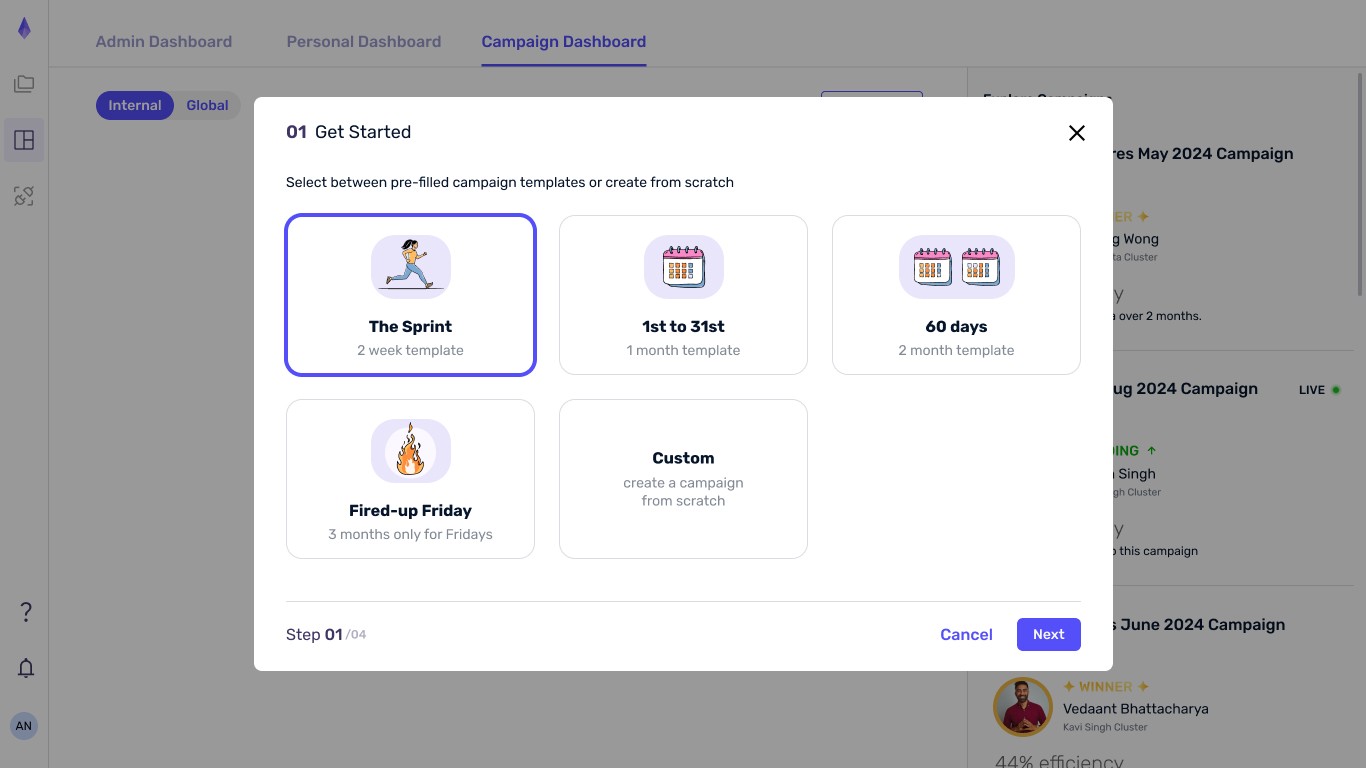
Step 1 of campaign creation - admin user screen

Ongoing campaign - end user screen

Ongoing global (company-wide) campaign - end user screen
Integrating Campaign Progress into the User Story Workflow
A celebratory popup notifies users immediately whenever they advance on the campaign leaderboard, ensuring campaign progress is seamlessly integrated into the primary user story workflow, keeping users informed and fostering engagement with the organization’s business objectives.
Dark UI screens for the product
Dark UI screens were also designed for the product, allowing users to choose their preferred viewing mode - light or dark - for a more comfortable and personalized experience.


User Interviews – Understanding Goals and Defining Pain Points
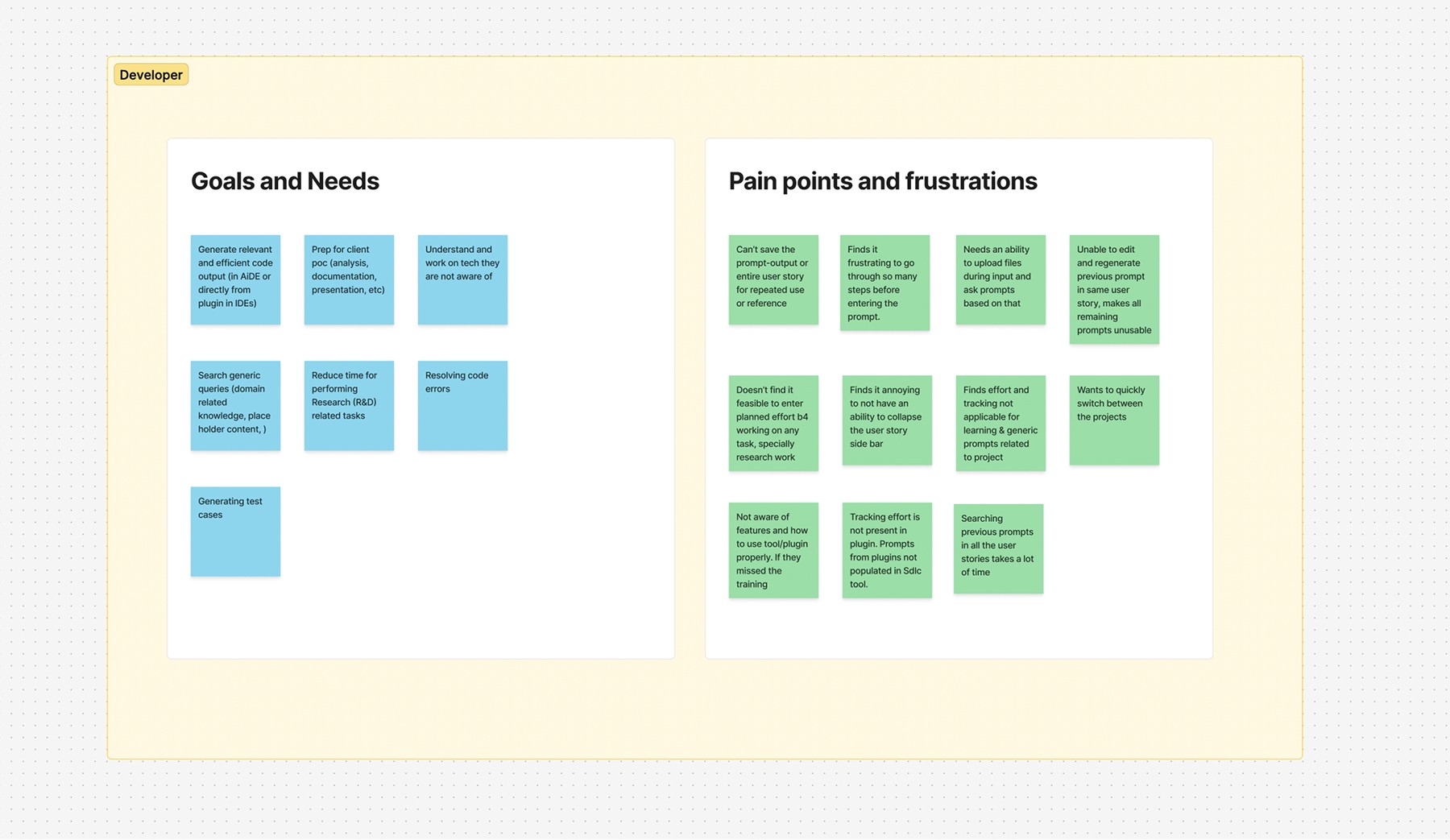
Interviewed 9 users comprising developers, testers, and project admins. These sessions helped uncover key user goals, day-to-day needs, common pain points, and valuable suggestions to inform product improvements and design decisions.

Summary of User Needs and Key Pain Points
The user interviews revealed a clearer picture of user goals, needs, and shared frustrations. The most pressing pain points identified were prioritized and directly informed the design of the wireframes.
information architecture


© 2025 Arianth tejas
All rights reserved